 SimSmsBox
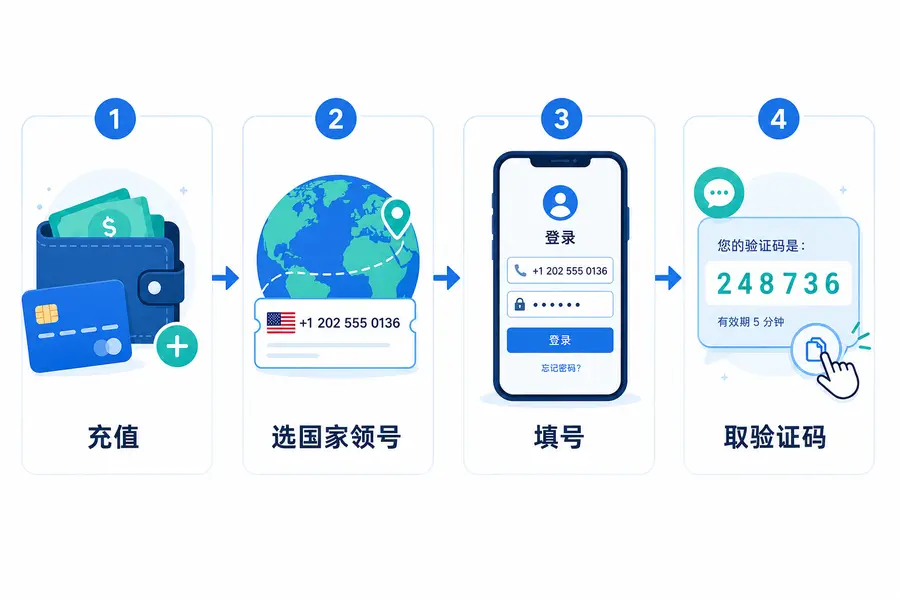
 How do you use an SMS platform? In one line: sign up and add funds → pick a country and service to rent a temporary number → enter that number in the app you’re registering → come back and copy the verification code. The whole thing takes under a minute, and you never expose your own SIM. Below, each step is broken down, with the spots where beginners usually get stuck.
First, what an SMS platform actually does
An SMS platform rents you a temporary phone number that receives one-time SMS codes. When you sign up for Telegram, WhatsApp, Google, or any service that demands phone verification, you use the platform’s number instead of your own. The code lands on the platform, and you copy it back into the app. It’s a good fit when you don’t want to expose your personal number, need to register an overseas service, or are creating several accounts.
Two terms to get straight first:
- Service (project): the app you’re registering for, e.g. Telegram. A number only receives SMS for the service you selected.
- Country / range: the country the number belongs to. Price and success rate vary by country.
Four steps to a single verification
Step 1: Sign up and add funds
Create an account on SimSmsBox, confirm your email, and log in. Go to the top-up page and add a small balance—SMS is billed per message and each one is cheap, so start small to test the water. If your balance is too low, you won’t be able to rent a number; that’s the first thing beginners trip on.
Step 2: Pick a country and service, then rent a number
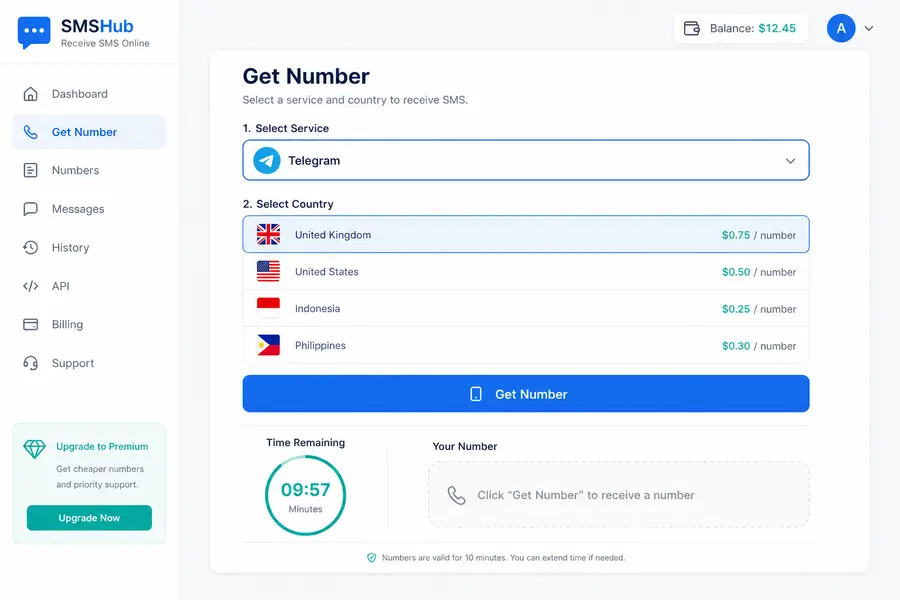
On the number/rent page, first choose the service you’re registering for (say, Telegram), then pick a country, confirm the price, and hit “Get number.” You’ll receive a number with its country code, and a countdown starts (usually a few to a dozen minutes). Finish the next steps before it runs out.
Step 3: Enter the number in the target app
Copy the number and paste it into the app’s phone field. Watch the country code: if the platform gives you 447911123456, select the UK (+44) in the app and enter only 7911123456—don’t repeat the country code. Then tap “Send code.”
Step 4: Copy the code back from the platform
Return to the platform, wait a few dozen seconds, and the code appears in that number’s log. Copy it into the app to finish verification. Once you have the code, bind an email or turn on two-factor right away, because this temporary number won’t stay yours for long.
Where SMS platforms are used most
- Registering overseas apps: Telegram, WhatsApp, Instagram, Tinder and other apps that require a phone number and aren’t friendly to certain local ranges.
- Running multiple accounts: for marketing, testing, or e-commerce, when one real number isn’t enough, rent numbers in bulk.
- Protecting privacy: for one-off sites or events where you’d rather not hand over your real number and collect marketing texts.
- One-time verification: many sign-ups and password resets only need a single SMS code—use it once and move on.
The four traps beginners hit
| Problem | Cause | How to avoid it |
|---|---|---|
| Can’t rent a number | Low balance / no stock for that service | Top up first; try another country |
| No SMS arrives | Wrong service / number already used | Double-check the service; swap numbers when time is up |
| App says number is invalid | Country code entered twice / bad format | Select the country code only once |
| Code expired | Countdown ended | Tap “Send” in the app first, then wait |
If you keep hitting “no SMS,” work through the checklist in Not receiving your SMS code? Here’s what to do. If privacy is a concern, read Are SMS verification platforms safe? first.
Number-picking tips for a higher success rate
- Use dedicated numbers for high-value services: for tightly controlled apps like WhatsApp and Google, don’t grab the cheapest shared number.
- Prefer compatible countries: ranges from the UK, US, Indonesia, and the Philippines tend to work well with mainstream apps.
- One number, one job: once a temporary number delivers the code, its job is done—don’t reuse it for long-term logins.
- Match the environment: if you use a proxy, keep the IP’s location aligned with the number’s country to lower the risk of being flagged.
FAQ
How long until the SMS arrives? Usually a few dozen seconds to two or three minutes after you submit the number. It can be slower at peak times—just wait within the countdown, or tap “Resend” in the app.
Can I reuse a number? A temporary number is meant for a single verification; once you have the code, treat it as spent. For long-term access, bind your own email or backup number quickly.
Why are some services more expensive? Apps like WhatsApp and Google are tightly controlled and burn through numbers fast, so dedicated high-success numbers cost more.
What’s the minimum to top up? It varies by platform; add enough for a few messages to test, then top up as needed once the flow works.
Wrapping up
The logic of an SMS platform is just four steps: add funds, pick a country and service to rent a number, enter it and send, then grab the code back. Take it slow the first time; after that, one account verification takes about a minute. Pick the right service and mind the countdown, and you’ll dodge most of the traps.